Color Map
The Color Map
The Mandelbrot set is defined by the formula \(z = z^2 + c\), where \(c\) is a point on the complex plane and \(z\) starts at \(0\). The formula is iterated upon up to ≢cmap times. The iteration at the point there the magnitude of \(z\) (\(|z|\)) exceeds \(2\) is the index in cmap which contains the color for that point. A point whose magnitude does not exceed 2 by ≢cmap iterations is considered to be in the Mandelbrot set.
The color map is stored in the global variable cmap. Internally cmap is a vector where the Nth element in contains the palette color (256⊥Red Green Blue) for points that escape the Mandelbrot set after N iterations. cmap is initialized by make_cmapbase.
Manipulating the Color Map
There are three ways to manipulate the color map. Any changes to cmap are temporary - clicking Reset or starting a new explorer will use the default cmap.
Color Map Editor
The color map editor (shown below) is invoked when you click the Edit button. To update a color, double-click on a square in the color grid. This will bring up a color picker that you can use to select a new color.
OK saves the updated cmap.
Update Clicking this previews the changes made to cmap.
Cancel Cancels any changes to cmap.
Generate If you modify 2 colors in the grid and click Generate, a smooth gradient between those colors will be generated.
Help Displays help for the Color Map Editor
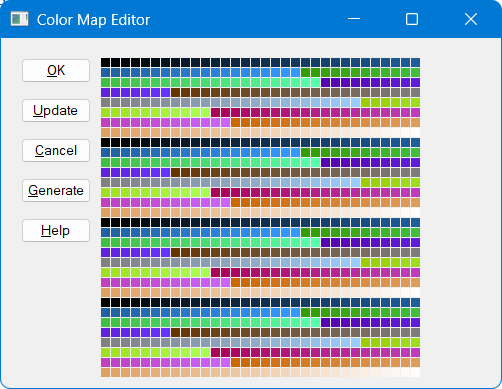 Click the Update button to preview the effect of your changes - they will not be saved until you click the OK button.
Ctrl-Click
If you hold down the Ctrl key and click either mouse button, the color picker becomes active and you can use it to modify the color all points that escape the Mandelbrot set
From the APL Session
You can manipulate cmap in the APL session. You can either work with it in its vector form, which is a tad inconvenient, or you can create a palette × 3 (or 3 × palette) matrix with each column (or row) representing values in the range 0-255 for red, green, and blue respectively.
After manipulating cmap you can click the Draw button, or run the draw function from the session to update the image. If you used the matrix form of cmap, redrawing the image will convert cmap back into vector form.
      cmap ← 0 0 255⌈⍤0 1⊢256 256 256⊤cmap ⍝ make it more blue
      draw